For Enquire Call us : 9811631557
DIPLOMA IN GRAPHICS AND VIDEO EDITING
Diploma in Graphics & Video Editing
Turn Your Creativity into Professional Design and Video Editing Skills
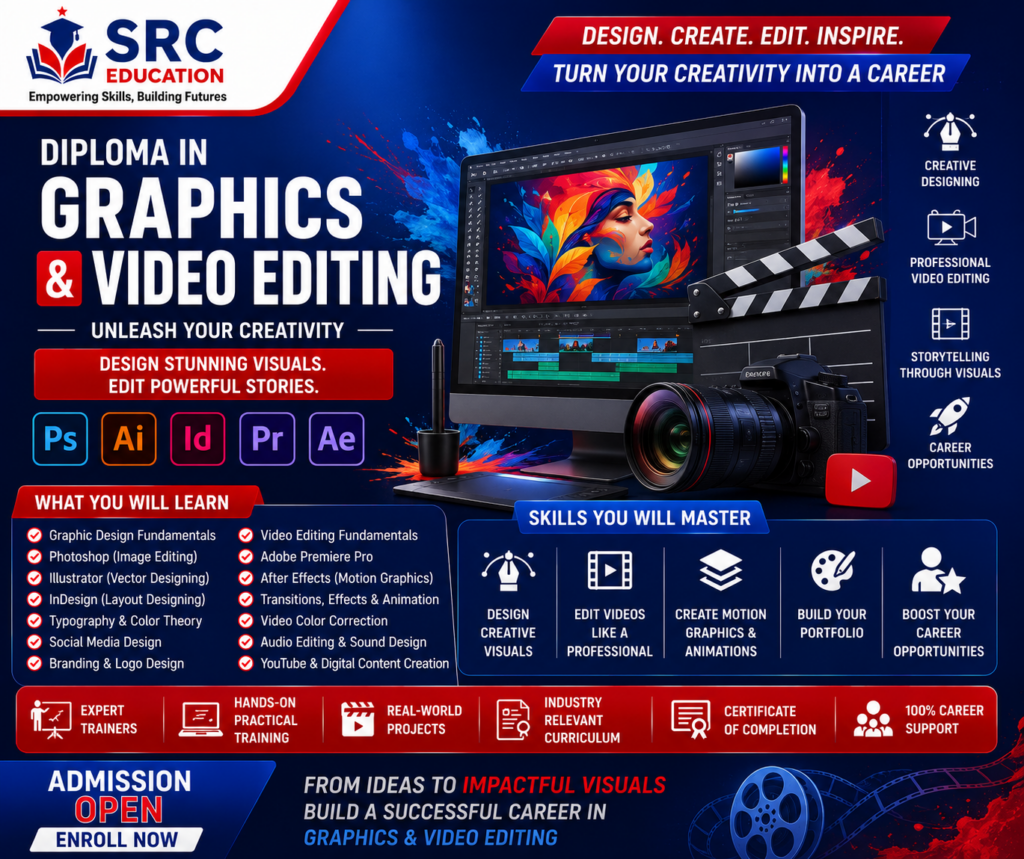
The Diploma in Graphics & Video Editing is a career-oriented professional program designed for students, graduates, content creators, freelancers, aspiring designers, social media professionals, entrepreneurs, and individuals who want to build practical skills in graphic design and video editing.
Visual content has become one of the most important parts of modern communication. Businesses, educational institutions, advertising agencies, social media brands, e-commerce companies, influencers, startups, and content creators all require attractive graphics and engaging videos to communicate with their audiences.
A professional graphic designer can create visual identities, social media creatives, advertisements, posters, banners, brochures, presentations, and marketing materials. Similarly, a video editor can transform raw footage into engaging videos for social media, advertisements, YouTube, educational content, corporate communication, and other digital platforms.
The Diploma in Graphics & Video Editing is designed to combine these two highly useful creative skills. Students can learn the fundamentals of visual design, typography, color, composition, image editing, branding, social media design, video editing, motion graphics, audio editing, storytelling, and professional content creation.
At SRC Education, the course is designed with a practical learning approach so that students can develop creative skills through exercises, assignments, projects, and real-world design and video editing activities.
What is Graphics & Video Editing?
Graphics design is the process of creating visual communication using elements such as images, colors, typography, shapes, illustrations, layouts, and branding elements.
Video editing involves arranging and enhancing video footage to create a complete visual story. It can include cutting clips, adding transitions, adjusting audio, applying effects, adding text, color correction, subtitles, graphics, and other elements.
When combined, graphic design and video editing provide a powerful creative skill set for the digital industry.
For example, a digital marketing campaign may require:
- Social media posts
- Promotional banners
- Video advertisements
- YouTube thumbnails
- Reels
- Short-form videos
- Product graphics
- Brand creatives
- Presentation designs
- Motion graphics
A professional with both graphics and video editing skills can contribute to multiple stages of digital content production.
Why Choose a Diploma in Graphics & Video Editing?
Develop Creative Skills
The course helps learners understand the principles of visual communication and develop their creative thinking.
Learn Graphic Design
Students learn how to create professional visual content for different purposes and platforms.
Learn Video Editing
Learners understand how raw footage can be edited into engaging videos.
Build Digital Content Skills
The combination of graphics and video editing is useful for social media, marketing, advertising, branding, and content creation.
Explore Freelancing Opportunities
Graphic design and video editing can be offered as freelance services to businesses, agencies, creators, and individuals.
Create a Professional Portfolio
Practical projects can help learners build a collection of designs and videos that demonstrate their skills.
Prepare for Creative Careers
The skills developed through the course can support career opportunities in graphic design, video editing, social media content, advertising, branding, and digital media.
Who Should Join This Course?
The Diploma in Graphics & Video Editing can be suitable for:
- Students interested in creative careers
- Graduates looking for professional skills
- Graphic design beginners
- Aspiring video editors
- Content creators
- YouTubers
- Social media managers
- Digital marketing professionals
- Freelancers
- Entrepreneurs
- Small business owners
- Advertising professionals
- Branding professionals
- Photography enthusiasts
- Individuals interested in digital media
- People who want to develop a creative portfolio
No advanced design experience is necessarily required to begin learning the fundamentals. The course can introduce learners to the concepts step by step.
Course Curriculum
The program covers important areas of graphic design and video editing.
Module 1: Fundamentals of Graphic Design
Students begin by understanding the basic principles of visual communication.
Topics include:
- Introduction to graphic design
- Elements of design
- Principles of design
- Visual hierarchy
- Composition
- Balance
- Contrast
- Alignment
- Proportion
- White space
- Visual communication
- Creative thinking
Students learn how different visual elements work together to create effective designs.
Module 2: Typography
Typography plays an important role in professional graphic design.
Students learn:
- Introduction to typography
- Font types
- Font selection
- Font pairing
- Font hierarchy
- Text alignment
- Spacing
- Readability
- Typography for social media
- Typography for advertisements
- Typography for branding
The objective is to help learners use text effectively in different types of visual designs.
Module 3: Color Theory
Color can influence the appearance, emotion, and communication of a design.
Students learn:
- Color fundamentals
- Color wheel
- Primary colors
- Secondary colors
- Color combinations
- Color harmony
- Contrast
- Brand colors
- Background colors
- Color psychology
- Color selection for digital designs
Understanding color theory can help designers create visually balanced and consistent designs.
Module 4: Image Editing
Image editing is an essential graphic design skill.
Students can learn:
- Image selection
- Cropping
- Resizing
- Image adjustment
- Background removal
- Layer management
- Image retouching
- Basic photo correction
- Text effects
- Image composition
- Creative image manipulation
These skills can be used for social media graphics, advertisements, websites, promotional materials, and other digital content.
Module 5: Professional Graphic Design Tools
Students can be introduced to commonly used graphic design software and tools.
Depending on the current course structure, training may include tools used for:
- Image editing
- Vector graphics
- Page layout
- Digital illustration
- Social media design
- Creative content creation
Students learn how to select the appropriate tool based on the design requirement.
Module 6: Logo Design and Branding
A logo is an important part of a brand identity.
Students learn:
- Logo fundamentals
- Brand identity
- Logo concepts
- Typography-based logos
- Symbol-based logos
- Color selection
- Logo composition
- Brand consistency
- Basic brand guidelines
- Professional logo presentation
Students can create logo concepts and understand how branding elements work together.
Module 7: Social Media Graphic Design
Social media platforms require visually attractive and platform-specific content.
Students learn to create concepts for:
- Instagram posts
- Instagram stories
- Reels covers
- YouTube thumbnails
- Facebook posts
- Promotional graphics
- Event posts
- Business announcements
- Educational posts
- Social media advertisements
Students also learn about maintaining consistency in colors, fonts, images, and branding.
Module 8: Advertising and Marketing Creatives
Businesses need graphics to promote products and services.
Students learn how to design:
- Promotional banners
- Digital advertisements
- Product advertisements
- Offer creatives
- Sale banners
- Event promotions
- Business announcements
- Marketing graphics
- Website banners
- Campaign creatives
The focus is on combining attractive design with clear marketing communication.
Module 9: Print Design Fundamentals
Although digital media is growing rapidly, print design remains useful for many businesses and organizations.
Students can learn about designing:
- Brochures
- Flyers
- Posters
- Business cards
- Certificates
- Invitations
- Pamphlets
- Banners
- Menus
- Promotional materials
Students also learn about basic layout, dimensions, typography, and print-ready design concepts.
Module 10: Introduction to Video Editing
The video editing section begins with understanding the fundamentals of video production.
Topics include:
- Introduction to video editing
- Video formats
- Resolution
- Frame rate
- Aspect ratio
- Video timeline
- Importing media
- Organizing footage
- Basic editing workflow
Students understand how video editing software is used to organize and transform raw footage.
Module 11: Video Cutting and Editing
Students learn the fundamental process of editing video footage.
Topics include:
- Importing footage
- Timeline editing
- Cutting clips
- Trimming
- Splitting clips
- Rearranging footage
- Removing unwanted sections
- Combining clips
- Basic transitions
- Creating sequences
These skills form the foundation of professional video editing.
Module 12: Audio Editing
Good audio is essential for professional videos.
Students learn:
- Audio fundamentals
- Importing audio
- Voice-over
- Background music
- Volume adjustment
- Audio synchronization
- Noise reduction fundamentals
- Audio transitions
- Sound effects
- Audio balancing
Students understand how audio and video work together to create a better viewing experience.
Module 13: Text, Titles and Subtitles
Text can improve communication and accessibility in videos.
Students learn:
- Adding titles
- Text animation
- Lower thirds
- Subtitles
- Captions
- Text placement
- Font selection
- Text transitions
- Brand typography
These skills are particularly useful for social media videos, educational videos, advertisements, and short-form content.
Module 14: Video Transitions and Effects
Transitions and effects can be used to improve the flow and visual quality of videos.
Students learn about:
- Basic transitions
- Scene changes
- Video effects
- Motion effects
- Zoom effects
- Speed adjustments
- Creative transitions
- Visual enhancements
The emphasis is on using effects appropriately rather than overloading the video.
Module 15: Color Correction and Color Grading
Color can significantly affect the appearance and mood of a video.
Students are introduced to:
- Color correction
- Brightness
- Contrast
- Exposure
- Saturation
- White balance
- Skin tone basics
- Color grading
- Creative color styles
These techniques can help make footage appear more consistent and visually appealing.
Module 16: Short-Form Video Editing
Short-form videos are widely used across social media platforms.
Students learn how to create content concepts for:
- Instagram Reels
- YouTube Shorts
- Promotional videos
- Educational clips
- Product videos
- Social media advertisements
- Brand videos
Topics include:
- Vertical video formats
- Hook development
- Fast-paced editing
- Captions
- Music
- Transitions
- Visual storytelling
- Short-form content structure
Module 17: YouTube Video Editing
YouTube content requires engaging storytelling and effective editing.
Students learn:
- YouTube video structure
- Intro and hook
- Cutting unnecessary footage
- B-roll
- Voice-over
- Background music
- Text overlays
- Subtitles
- Transitions
- End screens
- Thumbnail concepts
The objective is to help learners understand how videos can be edited for online audiences.
Module 18: Motion Graphics Fundamentals
Motion graphics combine graphic design and animation.
Students can be introduced to:
- Motion graphics
- Text animation
- Logo animation
- Basic keyframes
- Motion principles
- Animated graphics
- Transitions
- Visual effects
- Intro and outro concepts
Motion graphics can be useful for advertisements, social media videos, presentations, and branding.
Module 19: AI for Graphic Design and Video Editing
Artificial Intelligence is becoming increasingly useful in creative workflows.
Students can learn how AI can assist with:
- Creative ideas
- Design concepts
- Content brainstorming
- Background generation
- Image enhancement
- Content resizing
- Video editing assistance
- Caption generation
- Script ideas
- Content repurposing
- Creative workflow automation
AI should be used as a creative assistant while designers and editors continue to apply human judgment, originality, and quality control.
Module 20: Portfolio Development
A professional portfolio is important for demonstrating creative skills.
Students can work on projects such as:
- Logo designs
- Social media posts
- Posters
- Business cards
- Advertisements
- Brochures
- YouTube thumbnails
- Promotional videos
- Social media reels
- Short videos
- Brand creatives
- Motion graphics
A strong portfolio can help candidates demonstrate their capabilities to employers and potential clients.
Skills You Can Develop
After completing the Diploma in Graphics & Video Editing, learners can develop skills in:
- Graphic design
- Visual communication
- Typography
- Color theory
- Image editing
- Logo design
- Branding
- Social media design
- Advertising design
- Print design
- Video editing
- Audio editing
- Color correction
- Color grading
- Motion graphics fundamentals
- Short-form video editing
- YouTube video editing
- Thumbnail design
- Content creation
- AI-assisted creative workflows
- Creative thinking
- Visual storytelling
Career Opportunities After the Course
The combination of graphic design and video editing skills can open opportunities across multiple creative and digital industries.
Graphic Designer
Graphic designers create visual content for businesses, brands, agencies, websites, advertisements, and social media.
Video Editor
Video editors transform raw footage into finished videos for social media, YouTube, advertisements, businesses, and other digital platforms.
Social Media Designer
Social media designers create visual content for social platforms, including posts, stories, advertisements, and promotional graphics.
Motion Graphics Designer
Motion graphics professionals create animated text, graphics, logos, transitions, and visual elements.
Content Creator
Content creators produce graphics, videos, reels, thumbnails, and other digital content for online audiences.
Thumbnail Designer
Thumbnail designers create visually attractive thumbnails for YouTube and other video platforms.
Visual Designer
Visual designers focus on creating consistent visual experiences across digital platforms and marketing materials.
Creative Executive
Creative executives may support marketing teams with graphics, videos, campaigns, branding, and other creative requirements.
Video Content Editor
Video content editors work on digital video content for brands, creators, educational organizations, agencies, and businesses.
Freelance Designer and Video Editor
Professionals can offer design and video editing services independently to clients.
Freelancing Opportunities
Graphics and video editing are particularly suitable for freelance work because many services can be delivered digitally.
Freelancers may offer:
- Logo design
- Social media design
- Poster design
- Banner design
- Thumbnail design
- Video editing
- Reel editing
- YouTube editing
- Promotional videos
- Motion graphics
- Brand identity design
- Advertisement creatives
A professional portfolio, communication skills, consistency, and client management are important for building a successful freelance career.
Graphics and Video Editing for Digital Marketing
Digital marketing and creative design are closely connected.
A digital marketing campaign may require:
- Social media posts
- Reels
- Video advertisements
- Website banners
- Landing page graphics
- YouTube thumbnails
- Promotional videos
- Brand creatives
- Infographics
Professionals who understand both marketing and creative production can contribute to a wider range of digital projects.
Practical Learning Approach
Creative skills improve through practice.
At SRC Education, students can develop their skills through practical exercises, assignments, creative projects, and portfolio development.
Practical activities can include:
- Logo design projects
- Social media creative projects
- Poster design
- Advertisement design
- Thumbnail creation
- Video editing projects
- Reel editing
- Promotional video projects
- Branding projects
- Motion graphics exercises
Project-based learning can help learners understand how professional creative work is planned and executed.
Why Choose SRC Education?
Practical Curriculum
The course focuses on practical graphic design and video editing skills.
Creative Learning
Students can develop creativity, visual thinking, design concepts, and storytelling skills.
Portfolio Development
Practical projects can help learners build a portfolio to showcase their work.
Industry-Oriented Skills
The course covers skills relevant to social media, advertising, digital marketing, branding, and content creation.
AI Integration
Students can understand how AI can support modern creative workflows.
Career Guidance
Learners can receive guidance regarding career options, portfolio development, freelancing, and professional growth.
Frequently Asked Questions
What is a Diploma in Graphics & Video Editing?
It is a professional program that combines graphic design and video editing skills for digital, marketing, advertising, social media, branding, and creative industries.
Who can join this course?
Students, graduates, aspiring designers, content creators, freelancers, social media professionals, entrepreneurs, and beginners interested in creative skills can consider the course.
Do I need previous design experience?
Beginners can start by learning fundamental design and editing concepts. Previous professional experience is not necessarily required.
What can I create after learning graphic design?
You can learn to create logos, posters, social media graphics, advertisements, banners, brochures, thumbnails, branding materials, and other visual content.
What can I learn in video editing?
You can learn video cutting, transitions, audio editing, subtitles, text animation, color correction, short-form editing, YouTube editing, and other video production skills.
Can I become a freelancer after completing this course?
Yes. Graphic design and video editing are widely offered as freelance services. Your success will depend on your skills, portfolio, client communication, consistency, and ability to deliver quality work.
Can I work in a digital marketing agency?
Yes. Digital marketing agencies often require graphic designers and video editors to create social media content, advertisements, reels, promotional videos, and other marketing creatives.
Is AI included in the course?
The program can introduce learners to AI-assisted creative workflows, including creative brainstorming, image enhancement, content generation, video assistance, and productivity tools, depending on the current course structure.
Is portfolio development included?
Practical projects can be used to build a portfolio containing graphic designs, videos, social media creatives, thumbnails, branding work, and other creative projects.
Start Your Creative Career
The demand for visual content continues to grow as businesses increasingly depend on websites, social media, video platforms, digital advertising, and online branding.
A professional who can create both graphics and videos can support a wide range of digital content requirements.
The Diploma in Graphics & Video Editing at SRC Education is designed to help learners develop creative, technical, and practical skills while building a portfolio of professional work.
Whether your goal is to become a Graphic Designer, Video Editor, Social Media Designer, Motion Graphics Designer, Content Creator, Creative Executive, or Freelancer, this course can provide a strong foundation for your creative journey.
Take the Next Step
Turn your creativity into professional skills and learn how to create engaging visual content for the modern digital world.
Design. Edit. Create. Build Your Creative Career.
Contact SRC Education to learn more about the Diploma in Graphics & Video Editing, eligibility, duration, fees, batch timings, and admission process.