For Enquire Call us : 9811631557
CCC – Course on Computer Concepts
Sri Raam Computer Education (SRC Education) offers a practical and beginner-friendly CCC (Course on Computer Concepts) designed for students, beginners, job seekers, and anyone who wants to build a strong foundation in computer skills. The course focuses on essential computer knowledge and day-to-day applications so that learners can confidently use a computer for study, office work, documentation, calculations, presentations, and internet-related activities.
The CCC course is structured for beginners and does not require advanced technical knowledge. Students learn the fundamentals step by step through classroom explanations and practical computer training.
CCC Course at SRC Education
Computers have become an important part of education, office work, business, communication, and everyday life. Basic computer knowledge is therefore useful for students as well as working professionals and beginners.
The CCC course at SRC Education introduces students to the basic concepts of computers, operating systems, commonly used applications, and internet usage. The course gives learners practical exposure to applications such as Notepad, WordPad, MS Paint, MS Word, MS Excel, and MS PowerPoint, along with basic web browsing and internet usage.
The course is designed to help students understand how a computer works and how different applications can be used for everyday tasks.
CCC Course Duration & Class Details
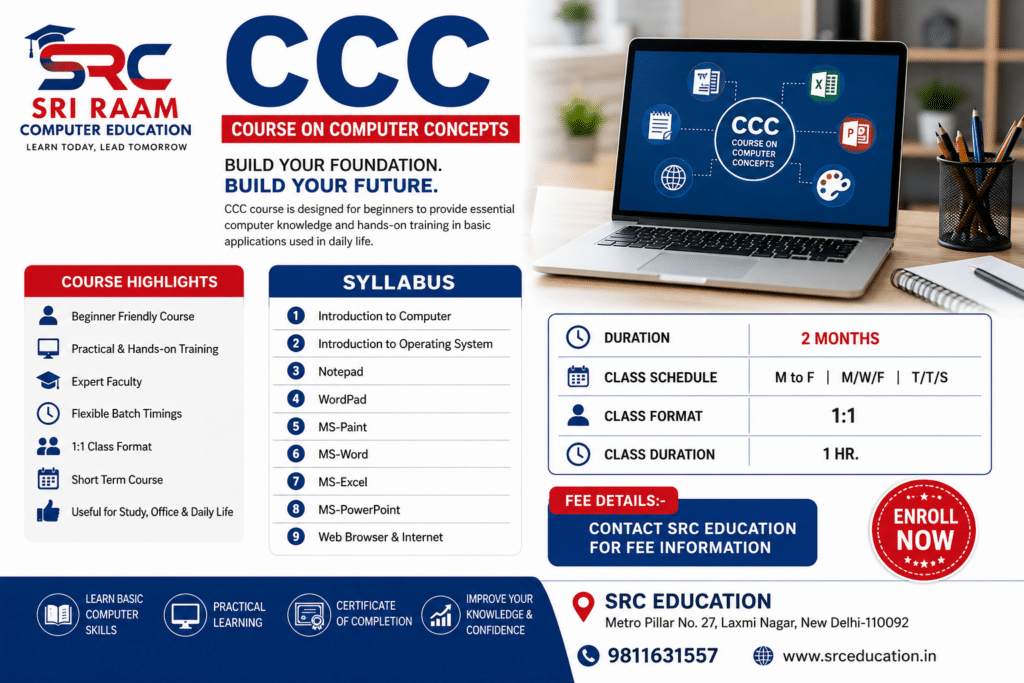
Course Duration: 2 Months
Class Schedule:
- Monday to Friday
- Monday / Wednesday / Friday
- Tuesday / Thursday / Saturday
Class Format: 1:1
Class Duration: 1 Hour
The flexible class schedule makes it easier for students and beginners to select a suitable learning routine according to their availability.
CCC Syllabus
The CCC syllabus at SRC Education covers the following basic computer topics:
1. Introduction to Computer
The course begins with an introduction to computers and their basic concepts. Students learn what a computer is, how it is used, and how it helps in completing different types of tasks.
This section helps beginners become familiar with the computer system and its basic components. Students are introduced to common computer terminology and learn the basic functions of a computer.
The objective is to develop basic computer awareness before moving toward practical applications.
2. Introduction to Operating System
Students are introduced to the operating system and its basic purpose. The operating system provides the environment through which users can interact with the computer and work with different applications and files.
Students learn basic operating system functions and become familiar with working on a computer system. This foundation helps them use other applications more comfortably during the course.
3. Notepad
Notepad is a simple text-editing application used for creating and editing basic text documents.
Students learn how to open Notepad, type and edit text, create simple notes, save files, and perform basic text-related tasks.
This topic gives beginners an easy introduction to working with text-based computer applications.
4. WordPad
Students are introduced to WordPad, a basic word-processing application that provides more formatting options than a simple text editor.
Learners understand how to create documents, enter text, make basic formatting changes, and save their work.
WordPad helps students understand basic document creation before they move to more commonly used word-processing tools such as MS Word.
5. MS Paint
MS Paint introduces students to basic computer drawing and image-editing activities.
Students learn how to use basic drawing tools, shapes, colours, text, and other simple features available in Paint. They can create simple drawings and edit basic images while developing familiarity with using the mouse and different computer tools.
This practical topic also makes computer learning easier and more engaging for beginners.
6. MS Word
MS Word is one of the important applications covered in the CCC course. Students learn the basics of creating and formatting documents.
The training includes practical activities such as:
- Creating a new document
- Typing and editing text
- Basic text formatting
- Changing font and font size
- Using bold, italic and underline
- Paragraph formatting
- Creating simple lists
- Inserting basic elements
- Saving and opening documents
- Printing documents
Students can use these skills to prepare simple letters, applications, assignments, notices, resumes, and other everyday documents.
The focus remains on basic and practical MS Word skills suitable for beginners.
7. MS Excel
The CCC course provides students with an introduction to MS Excel and basic spreadsheet usage.
Students learn how to enter information into rows and columns and organize simple data in a spreadsheet.
Basic topics include:
- Introduction to spreadsheets
- Working with rows and columns
- Entering data
- Editing cell contents
- Basic formatting
- Creating simple tables
- Basic calculations
- Saving and opening Excel files
MS Excel skills can be useful for maintaining simple records, lists, basic calculations, and everyday data-related tasks.
The training is kept at a beginner level so that students can understand the basic working of Excel without unnecessary advanced concepts.
8. MS PowerPoint
Students also learn the fundamentals of MS PowerPoint, which is used to create presentations.
The training introduces students to creating simple presentations, adding text, arranging information on slides, and presenting basic content.
Students learn how to:
- Create a presentation
- Add and edit slides
- Enter text
- Format basic content
- Arrange information on slides
- Use simple presentation features
- Save and open presentations
This knowledge can help students prepare basic presentations for educational and everyday purposes.
9. Web Browser & Internet
The final part of the CCC syllabus introduces students to web browsers and the internet.
Students learn the basic concept of the internet and how web browsers are used to access websites and online information.
The training covers basic activities such as:
- Understanding the internet
- Using a web browser
- Opening websites
- Searching for information
- Navigating web pages
- Using basic online services
- Understanding common internet terminology
The objective is to help beginners use the internet confidently for basic educational, professional, and everyday requirements.
What Will You Learn in the CCC Course?
After completing the CCC course at SRC Education, students will have a better understanding of basic computer operations and commonly used applications.
The course helps learners develop practical skills in:
- Basic computer operation
- Operating system fundamentals
- Text editing
- Basic document creation
- MS Word
- Basic spreadsheet work
- MS Excel
- Basic presentations
- MS PowerPoint
- Basic drawing using MS Paint
- Web browsing
- Internet usage
The emphasis is on learning by doing, allowing students to practice the concepts covered during their training.
Who Can Join the CCC Course?
The CCC course is suitable for beginners who want to learn basic computer skills.
It can be useful for:
- School and college students
- Beginners learning computers for the first time
- Job seekers
- Office beginners
- Students who want basic MS Office knowledge
- Individuals who want to improve their computer skills
- Anyone interested in learning everyday computer applications
No advanced computer knowledge is required to begin learning the basic concepts covered in this course.
Why Learn CCC at SRC Education?
Choosing the right computer institute can make basic computer learning easier and more practical. SRC Education focuses on helping students understand concepts clearly and practice them on a computer.
Beginner-Friendly Training
The CCC course is designed keeping beginners in mind. Concepts are introduced step by step so that students can understand the basics before moving to practical applications.
Practical Computer Learning
Students get the opportunity to practice the applications covered in the syllabus. Practical learning helps learners become more comfortable with computers.
Flexible Class Schedule
SRC Education provides multiple class schedule options, including Monday to Friday, Monday-Wednesday-Friday, and Tuesday-Thursday-Saturday batches.
1:1 Learning Option
The course is offered in a 1:1 class format, providing a focused learning environment for students.
Short-Term Course
With a duration of 2 months, the CCC course provides a structured way to learn essential computer concepts within a short period.
Benefits of Learning Basic Computer Skills
Basic computer knowledge can be useful in many areas of education and work. Students who understand common computer applications can perform everyday digital tasks more confidently.
Learning applications such as MS Word, MS Excel, and MS PowerPoint can help learners prepare documents, maintain simple information, perform basic calculations, and create presentations.
Internet knowledge can also help students find information, access online resources, and perform basic online activities.
The CCC course therefore provides a foundation that students can use for further computer learning.
Practical Approach to CCC Training
At SRC Education, the CCC course is focused on practical understanding rather than only theoretical information. Students are introduced to a topic and then get an opportunity to practice it.
For example, after learning the basic features of MS Word, students can practice creating and formatting a document. Similarly, after learning basic Excel concepts, they can practice entering information into a spreadsheet.
This practical approach helps beginners become more comfortable while working on a computer.
CCC Course for Students and Beginners
For students, basic computer knowledge can support educational activities such as preparing assignments, creating documents, making presentations, and searching for information online.
For beginners and job seekers, knowledge of common computer applications can provide a useful foundation for office-related computer tasks.
The CCC course is therefore a suitable starting point for learners who want to develop basic computer skills before moving toward other computer courses.
Career & Further Learning Opportunities
CCC is primarily a basic computer concepts course, so it should be viewed as a foundation rather than an advanced professional specialization.
After developing basic computer knowledge, learners may choose to continue their education with other suitable computer courses according to their career interests.
The skills learned in CCC can also make it easier for beginners to understand more computer applications in the future.
Why Choose SRC Education for CCC?
Sri Raam Computer Education (SRC Education) provides structured computer training for learners at different levels. The CCC course is designed specifically to introduce beginners to essential computer concepts and commonly used applications.
With a 2-month duration, 1-hour classes, flexible schedules, and 1:1 training, students can learn the fundamentals in a focused learning environment.
The syllabus covers only the essential topics required for basic computer learning, including computer fundamentals, operating system introduction, Notepad, WordPad, MS Paint, MS Word, MS Excel, MS PowerPoint, and web browser and internet usage.
Enroll in CCC Course at SRC Education
If you are looking for a beginner-friendly CCC computer course in Laxmi Nagar, SRC Education provides structured training covering essential computer concepts and applications.
The course is suitable for students, beginners, and learners who want to build confidence in using computers for everyday educational and professional tasks.
Start with the basics, practice essential applications, and build a strong foundation in computer usage with SRC Education.
Frequently Asked Questions – CCC Course
What is CCC?
CCC stands for Course on Computer Concepts. It is a basic computer course designed to introduce learners to essential computer concepts and commonly used applications.
What is the duration of the CCC course at SRC Education?
The CCC course at SRC Education has a 2-month duration.
What is covered in the CCC syllabus?
The syllabus includes Introduction to Computer, Introduction to Operating System, Notepad, WordPad, MS Paint, MS Word, MS Excel, MS PowerPoint, and Web Browser & Internet.
Is CCC suitable for beginners?
Yes. The course is designed for beginners and focuses on basic computer concepts and practical applications.
How long is each CCC class?
Each class is 1 hour long.
What class schedules are available?
The available schedules include Monday to Friday, Monday-Wednesday-Friday, and Tuesday-Thursday-Saturday.
Is the CCC course available in 1:1 format?
Yes, the course is offered in a 1:1 format.
Do I need advanced computer knowledge before joining?
No. The course starts with basic computer concepts, making it suitable for beginners.
What will I learn in MS Word?
You will learn basic document creation, typing, editing, formatting, saving, and other essential MS Word functions.
What will I learn in MS Excel?
You will learn basic spreadsheet operations, data entry, rows and columns, simple formatting, tables, and basic calculations.
Will I learn internet usage?
Yes. The course includes Web Browser & Internet, where students learn basic browsing and internet-related activities.
Conclusion
The CCC – Course on Computer Concepts at SRC Education is designed to provide beginners with essential computer knowledge in a simple and practical manner. From understanding the basics of a computer and operating system to working with MS Word, MS Excel, MS PowerPoint, MS Paint, Notepad, WordPad, and the internet, the course covers the fundamental skills needed for everyday computer use.
With a 2-month duration, 1-hour classes, flexible batch options, and 1:1 training, SRC Education provides a focused learning environment for students and beginners.
If your goal is to start learning computers from the basics and develop confidence in using commonly used computer applications, the CCC course at SRC Education can provide the right foundation.
Learn Computer Basics. Build Practical Skills. Start Your Digital Learning Journey with SRC Education.